
Easy Way To Write HTML. Using Ms word and more.
Here first you need to write the HTML basic code in notepad…,
Now you can write your title in title box and text and heading in body. Save you file.html extension. Then if you want to addas a picture copy the text below and type the location and text in the area given.
<img src=”your image path” Height=”” Width=”” Alt=”describe your image”>
If you want to add videos in your website so copy the following and add it in your HTML.
If you want to add a link in HTML use the following code.
If you want to add a button follow these steps and code…
Following are the main codes and rage and it functions
Basic HTML
<!DOCTYPE> Defines the document type
<html>Defines an HTML document<head>Contains metadata/information for the document<title>Defines a title for the document<body>Defines the document’s body<h1> to <h6>Defines HTML headings<p>Defines a paragraph<br>Inserts a single line break<hr>Defines a thematic change in the content<!–…–>Defines a comment
Formatting
TagDescription<acronym>Not supported in HTML5. Use <abbr> instead.
Defines an acronym<abbr>Defines an abbreviation or an acronym<address>Defines contact information for the author/owner of a document/article<b>Defines bold text<bdi>Isolates a part of text that might be formatted in a different direction from other text outside it<bdo>Overrides the current text direction<big>Not supported in HTML5. Use CSS instead.
Defines big text<blockquote>Defines a section that is quoted from another source<center>Not supported in HTML5. Use CSS instead.
Defines centered text<cite>Defines the title of a work<code>Defines a piece of computer code<del>Defines text that has been deleted from a document<dfn>Specifies a term that is going to be defined within the content<em>Defines emphasized text <font>Not supported in HTML5. Use CSS instead.
Defines font, color, and size for text<i>Defines a part of text in an alternate voice or mood<ins>Defines a text that has been inserted into a document<kbd>Defines keyboard input<mark>Defines marked/highlighted text<meter>Defines a scalar measurement within a known range (a gauge)<pre>Defines preformatted text<progress>Represents the progress of a task<q>Defines a short quotation<rp>Defines what to show in browsers that do not support ruby annotations<rt>Defines an explanation/pronunciation of characters (for East Asian typography)<ruby>Defines a ruby annotation (for East Asian typography)<s>Defines text that is no longer correct<samp>Defines sample output from a computer program<small>Defines smaller text<strike>Not supported in HTML5. Use <del> or <s> instead.
Defines strikethrough text<strong>Defines important text<sub>Defines subscripted text<sup>Defines superscripted text<template>Defines a container for content that should be hidden when the page loads<time>Defines a specific time (or datetime)<tt>Not supported in HTML5. Use CSS instead.
Defines teletype text<u>Defines some text that is unarticulated and styled differently from normal text<var>Defines a variable<wbr>Defines a possible line-break
Forms and Input
TagDescription<form>Defines an HTML form for user input<input>Defines an input control<textarea>Defines a multiline input control (text area)<button>Defines a clickable button<select>Defines a drop-down list<optgroup>Defines a group of related options in a drop-down list<option>Defines an option in a drop-down list<label>Defines a label for an <input> element<fieldset>Groups related elements in a form<legend>Defines a caption for a <fieldset> element<datalist>Specifies a list of pre-defined options for input controls<output>Defines the result of a calculation
Frames
TagDescription<frame>Not supported in HTML5.
Defines a window (a frame) in a frameset<frameset>Not supported in HTML5.
Defines a set of frames<noframes>Not supported in HTML5.
Defines an alternate content for users that do not support frames<iframe>Defines an inline frame
Images
TagDescription<img>Defines an image<map>Defines a client-side image map<area>Defines an area inside an image map<canvas>Used to draw graphics, on the fly, via scripting (usually JavaScript)<figcaption>Defines a caption for a <figure> element<figure>Specifies self-contained content<picture>Defines a container for multiple image resources<svg>Defines a container for SVG graphics
Audio / Video
TagDescription<audio>Defines sound content<source>Defines multiple media resources for media elements (<video>, <audio> and <picture>)<track>Defines text tracks for media elements (<video> and <audio>)<video>Defines a video or movie
Links
TagDescription<a>Defines a hyperlink<link>Defines the relationship between a document and an external resource (most used to link to style sheets)<nav>Defines navigation links
Lists
TagDescription<ul>Defines an unordered list<ol>Defines an ordered list<li>Defines a list item<dir>Not supported in HTML5. Use <ul> instead.
Defines a directory list<dl>Defines a description list<dt>Defines a term/name in a description list<dd>Defines a description of a term/name in a description list
Tables
TagDescription<table>Defines a table<caption>Defines a table caption<th>Defines a header cell in a table<tr>Defines a row in a table<td>Defines a cell in a table<thead>Groups the header content in a table<tbody>Groups the body content in a table<tfoot>Groups the footer content in a table<col>Specifies column properties for each column within a <colgroup> element<colgroup>Specifies a group of one or more columns in a table for formatting
Styles and Semantics
TagDescription<style>Defines style information for a document<div>Defines a section in a document<span>Defines a section in a document<header>Defines a header for a document or section<footer>Defines a footer for a document or section<main>Specifies the main content of a document<section>Defines a section in a document<article>Defines an article<aside>Defines content aside from the page content<details>Defines additional details that the user can view or hide<dialog>Defines a dialog box or window<summary>Defines a visible heading for a <details> element<data>Adds a machine-readable translation of a given content
Meta Info
TagDescription<head>Defines information about the document<meta>Defines metadata about an HTML document<base>Specifies the base URL/target for all relative URLs in a document<basefont>Not supported in HTML5. Use CSS instead.
Specifies a default color, size, and font for all text in a document
Programming
TagDescription<script>Defines a client-side script<noscript>Defines an alternate content for users that do not support client-side scripts<applet>Not supported in HTML5. Use <embed> or <object> instead.
Defines an embedded applet<embed>Defines a container for an external (non-HTML) application<object>Defines an embedded object<param>Defines a parameter for an object
If you want to modify and learn a website code select a website and click ctrl+U the code will be appear and to modify click F11 and modify the code pictures and happy learning.
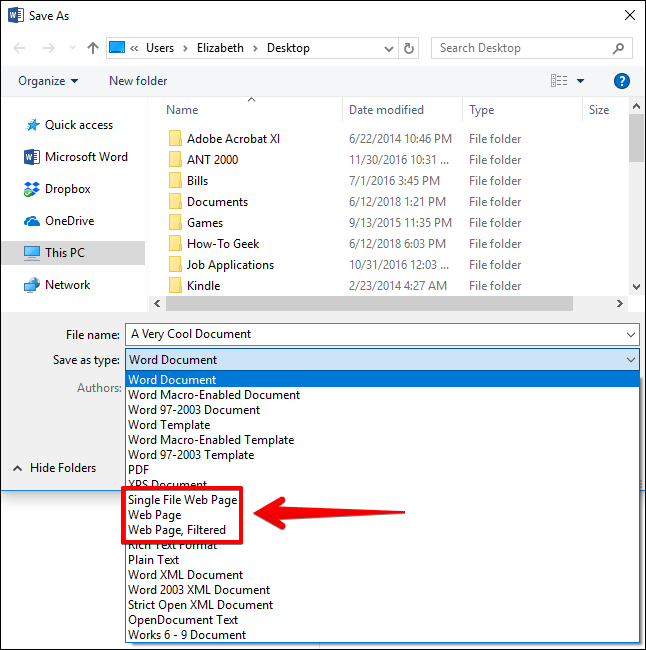
And if you want to make a website via Ms Word make a programs file and insert word art pictures and hyperlink etc in your file with web preview and save you document with all programs and. HTML extensions and select webpage filtered.
Thanks for viewing this page…
This page is made by addas with the help of word press…
 Muhammad addas